dataeval Cleaning Tutorial
A guide to running the dataeval cleaning tools via checkmaite.
NOTE: The
dataevalpackage can be used in the checkmaite framework for both image classification (IC) and object detection (OD) tasks. This tutorial will only cover the OD scenario.
What is dataeval?
The dataeval package analyzes datasets and models to give users the ability to train and test performant, unbiased, and reliable AI models and monitor data for impactful shifts to deployed models.
The tools demonstrated in this tutorial are a subset of the larger dataeval framework. They are specifically focused on dataset cleaning - the process of removing invalid, irrelevant or low-quality data from a dataset.
At a high-level, dataset cleaning proceeds as follows:
- Compute mathematical fingerprints for each image
- Remove images whose fingerprints are equal or almost equal
- Compute statistics related to the shape and display of each image
- Remove images which are considered statistical outliers
For OD tasks, dataset cleaning continues with further analysis:
- Compute statistics related to the labels of each bounding box
- Flag label categories which have unusual statistics as requiring further investigation by the user
- Compute statistics related to the shape and display of each bounding box
- Remove bounding boxes which are considered statiscal outliers
The dataeval cleaning algorithms are generally applied to an entire dataset. Their computational demands are low-to-moderate, and are run entirely on CPU.
Overview and Background
This section will outline the aspects most relevant to applying the dataeval cleaning tools to Object Detection problems similar to the RI's use case.
For more in-depth reading on the tool, visit the dataeval documentation
Hashing Algorithms - 'Mathematical Fingerprints'
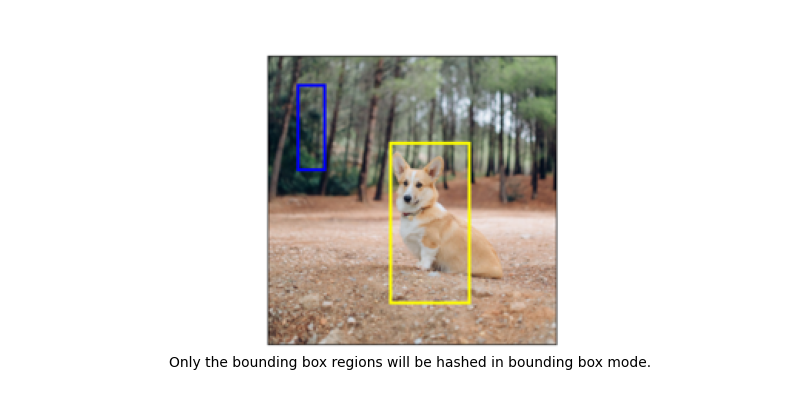
Identifying duplicate or near-duplicate images and annotations is an important step in dataset creation and curation.
Overview
The duplication detection process identifies two types of duplicates:
- Exact Duplicates: Images or bounding boxes that are pixel-for-pixel identical.
- Near Duplicates ('Perceptual Duplicates'): Images or bounding boxes that are visually similar to a human observer, even if they differ slightly due to compression artifacts, minor resolution changes, or subtle color shifts.
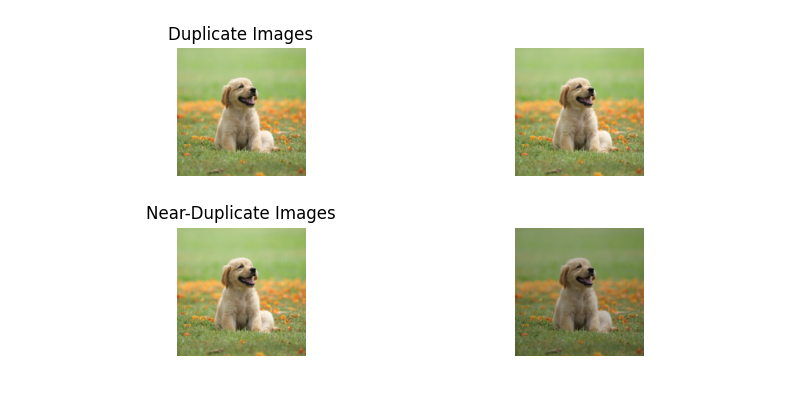
What does 'near' mean?
Perceptual Hashing
Imagine you want to identify images that look the same, even if they've been (accidentally) grayscaled, compressed, or had minor color changes. A normal (cryptographic) hash like MD5 or SHA would change drastically even if only one pixel is different. A perceptual hash aims to create a short "fingerprint" that captures the essential visual structure of the image. It was designed to identify images that have minimal differences. It was not designed to handle more substantial differences such as crop/rotation/skew/aspect ratio changes.
The perceptual hashing algorithm in dataeval takes an image, shrinks it down drastically while removing color, analyzes the core structure using frequency decomposition, creates a binary fingerprint based on whether structural components are above or below average strength, and finally represents this fingerprint as a hex string. The result is a short hash sensitive to major visual changes but robust to some common modifications like simple color/brightness adjustments.
Weaknesses
The algorithm is likely to fail (produce different hashes for visually similar images) in cases involving:
- Significant Cropping / Aspect Ratio Changes
- Rotations / Skewing / Perspective Shifts
- Mirror Images (Flips)
Outlier Analysis
Outliers often correspond to annotation errors, corrupted data, low-quality images, or rare edge cases that warrant further investigation.
Overview
The outlier detection process uses various statistical metrics. By analyzing the distribution of these metrics, we can detect several types of outliers:
- Validity Outliers: Data points that are technically invalid or corrupted (e.g., images with missing pixels).
- Quality Outliers: Images or annotations that are technically valid but exhibit poor quality (e.g., severely blurred images).
- Annotation Outliers: Annotations that are statistically unusual in terms of size, shape, or placement relative to typical annotations (e.g., extremely large or small boxes).
- Distributional Outliers: Data points that represent rare occurrences or potential imbalances within the dataset (e.g., images with an exceptionally high number of objects).
What statistical metrics are computed?
Broadly speaking, the metrics can be divided into the following groups, from which outliers are computed:
from collections.abc import Mapping, Sequence

import numpy as np


class DataevalCleaningDimensionMetrics:
    "Metrics related to image or bounding box dimensional quantities."

    offset_x: np.ndarray
    offset_y: np.ndarray
    width: np.ndarray
    height: np.ndarray
    size: np.ndarray
    aspect_ratio: np.ndarray
    depth: np.ndarray
    center: np.ndarray


class DataevalCleaningVisualMetrics:
    "Metrics related to image or bounding box visual quantities."

    brightness: np.ndarray
    contrast: np.ndarray
    darkness: np.ndarray
    missing: np.ndarray
    sharpness: np.ndarray
    zeros: np.ndarray
    percentiles: np.ndarray


class DataevalCleaningLabelMetrics:
    "Metrics related to bounding box labels."

    label_counts_per_class: Mapping[int, int]
    label_counts_per_image: Sequence[int]
    image_counts_per_class: Mapping[int, int]
    image_indices_per_class: Mapping[int, Sequence[int]]
    image_count: int
    class_count: int
    label_count: int
    class_names: Sequence[str]
In addition, a ratio is computed between bounding box and image values for a small number of metrics. Outliers are then computed for these ratio metrics, and are used to flag bounding boxes that require further investigation by a user.
Running the dataeval cleaning algorithms inside checkmaite
The following section uses the checkmaite API to run the dataeval cleaning test stage for Object Detection.
First, we create the the necessary MAITE-wrapped dataset. We use the CocoDetectionDataset wrapper. The data is found in our test directory, and is a four-image subset of the COCO 2017 test dataset.
from pathlib import Path

from checkmaite.core.object_detection.dataset_loaders import CocoDetectionDataset

BASE_DIR = Path.cwd().parents[1]
dataset_root_path = BASE_DIR / "tests/data_for_tests/coco_dataset"
dataset_ann_file_path = BASE_DIR / "tests/data_for_tests/coco_dataset/ann_file.json"

print("Loading example COCO dataset...")
dataset = CocoDetectionDataset(root=dataset_root_path, ann_file=dataset_ann_file_path, dataset_id="coco-example")
print(f"Dataset loaded with {len(dataset)} images")
Loading example COCO dataset...
Dataset loaded with 4 images
/home/runner/work/checkmaite/checkmaite/.venv/lib/python3.10/site-packages/xaitk_saliency/__init__.py:3: UserWarning: pkg_resources is deprecated as an API. See https://setuptools.pypa.io/en/latest/pkg_resources.html. The pkg_resources package is slated for removal as early as 2025-11-30. Refrain from using this package or pin to Setuptools<81.
  import pkg_resources
Next, we initialize an DatasetCleaningTestStage object, load the dataset wrapped above, and execute the test stage.
from checkmaite.core.object_detection import DataevalCleaning

test_stage = DataevalCleaning()
output = test_stage.run(use_cache=False, datasets=[dataset])
Slide Deck
Once the test stage has completed, the code below uses the gradient package to create HTML and PPTX formatted reports of the results of the dataeval cleaning test stage.
import os

from checkmaite.core.report._markdown import create_markdown_output

output_dir = Path("dataeval_cleaning_example_output")
os.makedirs(output_dir, exist_ok=True)

create_markdown_output(
    output.collect_md_report(threshold=0), output_dir, md_filename="Dataeval_Cleaning_Example_Report.md"
)
print(f"Markdown report saved in {output_dir}.")
Markdown report saved in dataeval_cleaning_example_output.