dataeval Shift Tutorial
A guide to running the dataeval shift tools via checkmaite.
NOTE: The
dataevalpackage can be used in the checkmaite framework for both image classification (IC) and object detection (OD) tasks. This tutorial will only cover the OD scenario.
What is dataeval?
The dataeval package analyzes datasets and models to give users the ability to train and test performant, unbiased, and reliable AI models and monitor data for impactful shifts to deployed models.
The tools demonstrated in this tutorial are a subset of the larger dataeval framework. They are specifically focused on identifying statistical differences between operational data and training data. A common cause of model degradation in an operational setting is a significant deviation between the operational and training data.
At a high-level, identifying statistical differences between datasets involves:
- Using an AI model to generate mathematical representations of the different datasets
- Performing a range of statistical tests to determine whether there are differences between these mathematical representations
The dataeval shift tools are generally applied to an entire dataset. Their computational demands are moderate, and are run on both CPU and GPU. (The AI models are run on GPU, but they can also be run on CPU if a GPU is not available.)
Overview and Background
This section will outline the aspects most relevant to applying the dataeval shift tools to Object Detection problems similar to checkmaite's use case.
For more in-depth reading on the tool, visit the dataeval documentation
Using an AI model to generate a mathematical representation of a dataset
For these capabilities we use transfer learning: a frozen, pre-trained image-classification network is used as a feature extractor. We do not train a new model here because that would be too slow and expensive for a general-purpose check. Instead, each image is run through the pre-trained network and the resulting feature vector is treated as its embedding (a numeric representation used for distance/similarity-based analysis).
Domain mismatch risk
We currently use model backbones that are pre-trained on ImageNet (natural RGB photos). If your data is very different e.g. medical scans, satellite imagery, grayscale/non-RGB inputs, or unusual sensors, then these embeddings may be less meaningful.
Alternatives (often better “frozen” embeddings)
DINOv2: a strong general-purpose default; often produces richer embeddings than supervised ImageNet backbones.
CLIP (vision encoder): a good choice when images contain common, semantically meaningful objects; embeddings tend to line up well with human concepts.
Please contact the checkmaite team if you would like to see support for DINOv2 or CLIP added.
Detecting Dataset Drift
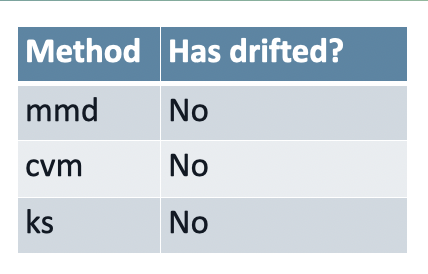
Drift refers to the phenomenon where the statistical properties of data change over time, leading to discrepancies between the data a model was trained on and the data it encounters during deployment. This can significantly degrade the performance of machine learning models, as the assumptions made during training may no longer hold in real-world scenarios.
dataeval provide three different statistical tests for detecting dataset drift:
Cramér-von Mises
Kolmogorov-Smirnov
Maximum Mean Discrepancy
Detecting Out-of-Distribution Data
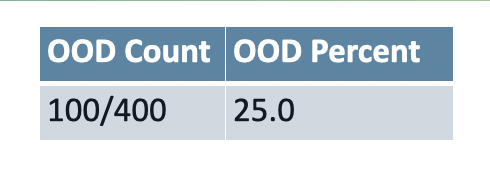
Out-of-distribution (OOD) detectors identify operational data that is different from the data used to train a particular model. This is a reasonably advanced topic that uses a specially designed set of AI models to de-construct and then re-construct an operational dataset. The re-constructed dataset is then compared against the original dataset. If there are large differences, then this is evidence that suggests that the operational data is substantially different to the training dataset.
Running the dataeval shift detection algorithms inside checkmaite
The following section uses the checkmaite API to run the dataeval shift test stage for Object Detection.
First, we create the the necessary MAITE-wrapped datasets. We use the CocoDetectionDataset wrapper. The data is found in our test directory.
from pathlib import Path

from checkmaite.core.object_detection.dataset_loaders import CocoDetectionDataset

BASE_DIR = Path.cwd().parents[1]
dataset_root_path = BASE_DIR / "tests/data_for_tests/coco_resized_val2017"
dataset_ann_file_path = BASE_DIR / "tests/data_for_tests/coco_resized_val2017/instances_val2017_resized_6.json"

print("Loading training COCO dataset...")
dataset_train = CocoDetectionDataset(root=dataset_root_path, ann_file=dataset_ann_file_path, dataset_id="coco-train")
print(f"Dataset loaded with {len(dataset_train)} images")
Loading training COCO dataset...
Dataset loaded with 6 images
/home/runner/work/checkmaite/checkmaite/.venv/lib/python3.10/site-packages/xaitk_saliency/__init__.py:3: UserWarning: pkg_resources is deprecated as an API. See https://setuptools.pypa.io/en/latest/pkg_resources.html. The pkg_resources package is slated for removal as early as 2025-11-30. Refrain from using this package or pin to Setuptools<81.
  import pkg_resources
from pathlib import Path

from checkmaite.core.object_detection.dataset_loaders import CocoDetectionDataset

BASE_DIR = Path.cwd().parents[1]
dataset_root_path = BASE_DIR / "tests/data_for_tests/coco_dataset"
dataset_ann_file_path = BASE_DIR / "tests/data_for_tests/coco_dataset/ann_file.json"

print("Loading operational COCO dataset...")
dataset_operational = CocoDetectionDataset(root=dataset_root_path, ann_file=dataset_ann_file_path, dataset_id="coco-op")
print(f"Dataset loaded with {len(dataset_operational)} images")
Loading operational COCO dataset...
Dataset loaded with 4 images
Next, we initialize an DatasetShiftTestStage object, load the dataset wrapped above, and execute the test stage.
from checkmaite.core.object_detection import DataevalShift

capability = DataevalShift()
output = capability.run(use_cache=False, datasets=[dataset_train, dataset_operational])
Slide Deck
Once the test stage has completed, the code below uses the gradient package to create HTML and PPTX formatted reports of the results of the dataeval shift test stage.
import os

from checkmaite.core.report._markdown import create_markdown_output

output_dir = Path("dataeval_shift_example_output")
os.makedirs(output_dir, exist_ok=True)

create_markdown_output(
    output.collect_md_report(threshold=0), output_dir, md_filename="Dataeval_Shift_Example_Report.md"
)
print(f"Markdown report saved in {output_dir}.")
Markdown report saved in dataeval_shift_example_output.